Recieving a Well Being eCard - Safe listing a sender
All Well Being eCards will be sent from the address - wuth@cubemail.uk
When you receive an eCard the pictures will not auto display; this is a security function. Once you receive your first eCard this restriction can be overridden within Outlook by ‘safe listing’’, this means you are confirming the sender (wuth@cubemail.uk) is safe and the email content does not need to be restricted. This adjustment only needs to be done once and means that all future eCards you’re sent will auto display their artwork. NHS mail cannot make this adjustment for the whole Trust; as a result individual users are required to safelist the sender.
How to safe list in Outlook
Whilst in the email you’ve received - from the main Outlook ribbon (usually top left) you can select Junk – Junk E-mail Options.
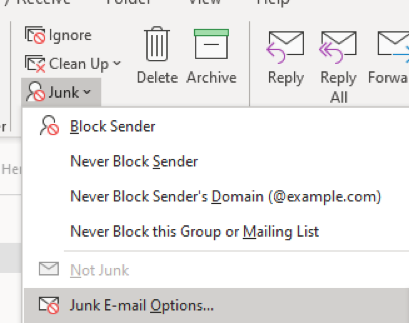
You then have the option to manually add addresses to safe senders and recipients.

Within the Safe Senders Tab - select Add, enter wuth@cubemail.uk, select OK, select Apply and select OK